
How to use Maven 4.0

This article presents a short overview of what has changed in Maven 4: changes in POM, most important improvements and a short migration guide. It is packed with helpful links which - I hope - will inspire you to check and play with this (still in beta) new Maven release.
Important links
You don’t need to read this article. Just look at the reference below: \uf0a7
- What’s new in Maven 4 - on maven.apache.org
- Migrate to Maven 4 - in maven guide
- Guide to Working with Multiple Subprojects in Maven 4
- IntelliJ Idea Conf 2024 - a talk: “The current state of Apache Maven 4” by Karl Heinz Marbaise
The problem
The problem that maven 4 solves is the lack of separation of concerns. And there are two which - untill maven 4 - were not cleanly set apart:
- the POM has info about configuration and this piece of info is needed to build an artifact; after it is built, that info is not needed anymore
- the POM also contains dependencies which are needed by other projects that depend on this artifact (i.e. are needed by consumers of the artifact) Because of the second point maven build information become part of the ecosystem: dependencies on maven central repository, other build tools and IDES and this made maven schema (i.e. pom syntax) fixed and unable to evolve,
The solution
The solution is to separate the information needed for the build from the information needed by the consumers (and without breaking the ecosystem). Manven 4 prepares for that.
The requirements
- Maven 4 requires Java 17 (which is only needed to run Maven and you can still compile against older Java versions - see compiler plugin configuration and maven toolchains which come with a guide)
POM changes
- Maven 4 generates a stripped-down consumer POM that removes build information (not needed by consumers) and deploys this fo a remote repository; it does not deploy the build POM, i.e. the pom.xml used to build the project
- model version: 4.1.0 - this version adds new elements and attributes and deprecates others
- Maven 4 still builds poms in version 4.0.0 of the model - we still can use it if we don’t use/need new features
- maven modules are now called subprojects (this helps to overcome the confusion with Java 9 modules from Java Platform Module System)
- top level dir of a maven project contains
srcdir andpomx.ml - it can have other maven projects in subdirectories , each with its own
pom.xml - maven does not build subprojects unless they are linked from the root pom.xml
- if there are subprojects, we call such setup a
multi-project setup, otheriwise it issingle-project setup
- top level dir of a maven project contains
- model version 4.1.0 contains a new
<subprojects>element instead of<modules>element (which still works)
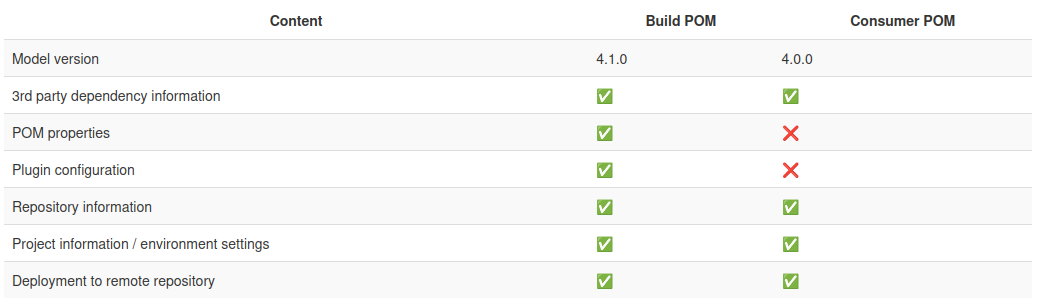
Compare build POM and consumer POM
The below graphics from What’s new in Maven 4 shows that consumer poms will not contain POM properties and plugin configuration - info which certainly is not necessary for artifact’s consumers!
The root directory
-
project root is defined either by creating
.mvndirectory (which may includemaven.configorjvm.configfiles for project-specificconfiguration) or (when model version 4.1.0 is used) setting therootattibute of<project>element totrue -
there is official propertis for a root folder:
${session.topDirectory}- alwys defined; this is current working directory during build; can change depending where the build is run from${project.rootDirectory}and${session.rootDirectory}- defined only when.mvndirectory is defined orrootistrue; both always have the same value for the same project
Improvements
- parent pom is automatically versioned; subprojects don’t need to define versions of the parent
- also dependencies to subprojects don’t need versions - by default they have the same version as parent pom
- build failing
- introduced
--fail-on-severityor-fosparameter that fails the build if at least one log message is of given severity (egWARN) - build fails by default if profile does not exist; you can use profile conditionally if it exists (and allow build pass otherwise) with
?, e.g. ifnonexistentis the name of a non-existent profile,mvn compile -P?nonexistentwill pass whilemvn compile -Pnonexistentwill always fail
- introduced
- lifecycle changes
- instead of ordered list of phases, Maven 4 uses a tree: this allows phases to be skiped
before:andafter:phases were introduced with ability to order them by priority as int value in[]braces, eg.before:integration-test[100]andbefore:integration-test[200]- new phases:
all,each,before:all,after:all,before:each, andafter:each
- tools
- improved performane with
mvnd(Maven Daemon) which keeps a pool of ready-to-be-reused maven processes - added new tool,
mvnshwhich keeps a single Maven process while the shell is open
- improved performane with
Creating a release
Creating a release is now possible without a plugin (well, the plugin can create the Git tags so it is still useful). For a detailed explanation see Easier Versions article.
Migration to Maven 4
Instructions on how to migrate are given in Migrate to Maven 4. The steps are as follows:
- use latest maven 3.9 and make sure your project builds withour issues.
- upgrade plugins to their latest Maven 3 version. You can use
version-maven-pluginwithdisplay-plugin-updates(see Versions Maven Plugin) to see which are the latest available versions of the plugins you use - upgrade build environment to support Java 17 (this is what Maven 4 requires)
- install and use Maven 4: Where To Install, How to Install; you may need to configure:
- Maven Wrapper’s
maven-wrapper.properties - Required Maven Version rule of the Maven enforcer plugin
- CI/CD configuration and/or pipelines
- Maven Wrapper’s
- check if there are Maven 4 versions of your plugins (again, use Versions Maven Plugin)
Other, optional steps of a migration are explained in Migrate to Maven 4 document.
Have fun!